Your till, stock and books.
One clearer view.
Pirates Books is our point-of-sale and bookkeeping software, shaped by the daily demands of drinks distribution. Explore counter sales, stock, returnable deposits and business records in a walkthrough of the current setup.
New to Pirates Books? We will confirm feature availability, access and pricing for your business before you start.
Built around trade
Less guesswork at the counter
Start with the way your business actually works, then check the software against it.
Counter to office
Bring your questions about daily sales, cash-up and the records you need when the trading day ends.
Crates and customers
Discuss product pack sizes, returnable deposits, stock movements and customer-account balances.
Your setup, checked
Walk through your devices, connectivity, staff access and reporting needs before moving live records.
Getting started
See it. Check it. Then decide.
Tell us about your outlet
Share your business type, number of users and the way you currently record sales and stock.
Walk through the software
Ask to see the current workflows that matter to your day-to-day trading.
Agree the scope and price
Confirm enabled features, setup needs, support, payment method and any trial terms in writing.
Plan your start
Check opening balances, products, user access and the records you will keep during the changeover.
The workflows
Bring your working day to the demo
These are the areas to review with us, not a promise that every module or integration is enabled for every account.
Till & daily sales
Walk through product selection, tender entry, receipt handling and the end-of-day cash-up.
Stock & purchases
Review product pack sizes, supplier purchases, stock movements and the counts your outlet needs.
Empties & deposits
Discuss bottles and crates issued, returns received and deposit balances by customer.
Customer accounts
Check account sales, statements, balances and the credit controls required for your business.
Expenses & reporting
Review operating costs and the management reports you need, including what your accountant will require.
Additional modules
Ask about fleet, delivery and payroll availability. Any extra scope should be included in your written setup proposal.
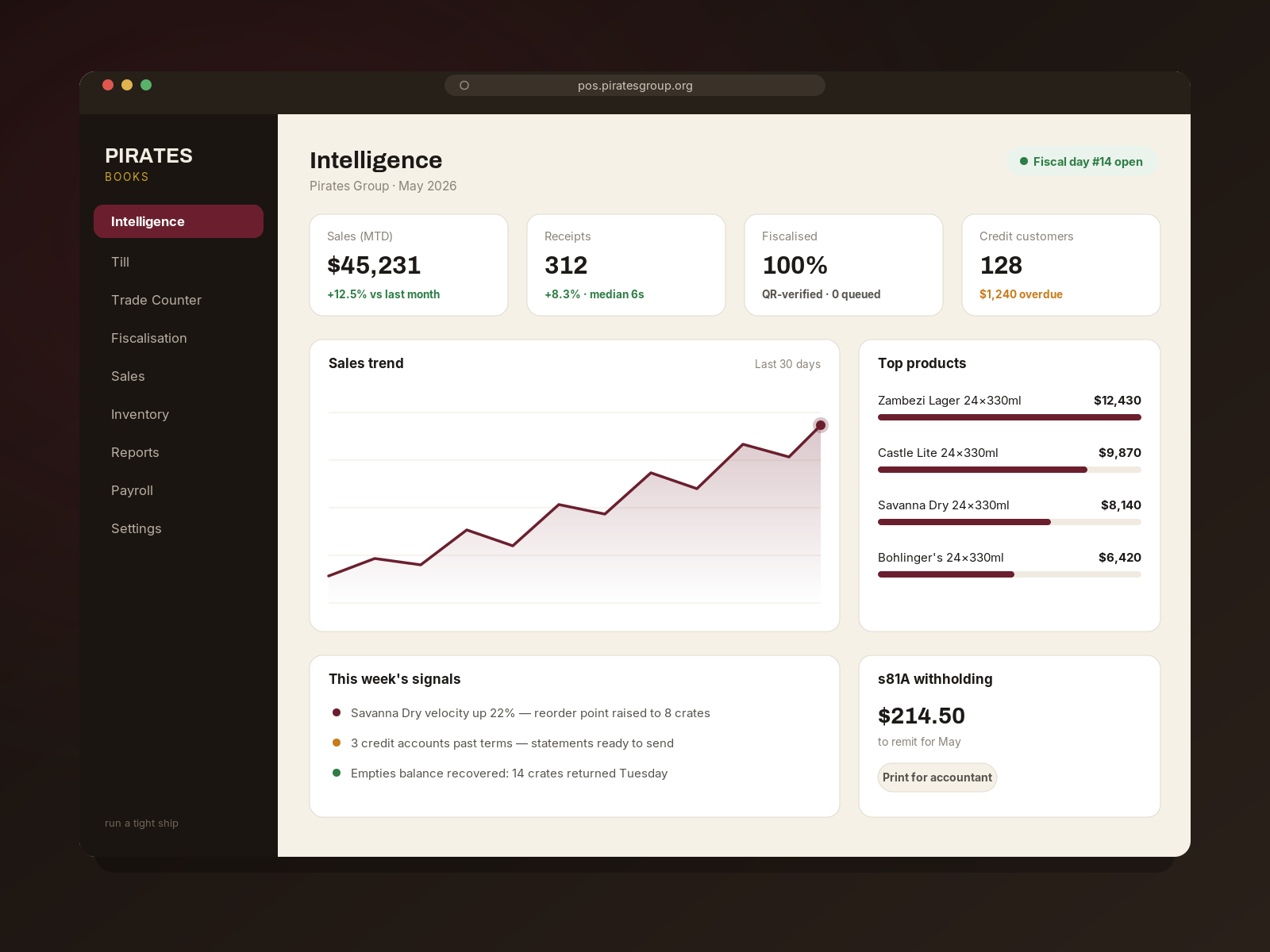
From the drinks trade
Software with a distributor's perspective
Pirates Group connects wholesale supply, mobile-bar services and business software. Pirates Books comes from the same practical questions: what sold, what is left, who owes us and which empties are still out?
- Start with your workflow — show us how your outlet trades today.
- Look at the current build — assess the features you need in a walkthrough.
- Keep the records clear — agree opening balances, access and reporting before moving across.
Before you rely on it
Check the details that matter
Use the walkthrough to agree integrations, connectivity and reporting requirements before moving your live trading records.
Fiscalisation & tax
Ask us to confirm the current ZIMRA integration status and demonstrate the setup relevant to your business. Do not treat this page as confirmation of regulatory approval or compliance.
Connectivity & access
Test your devices, connection and staff permissions. Agree which actions work without a connection and how records are reconciled afterwards.
Payments & reporting
Confirm supported payment workflows, currencies, reporting scope and export options. Agree the records your accountant needs before depending on them.
Pricing & access
Get the current offer
for your business.
Tell us what you need and request the current terms. Confirm the monthly price, any trial, included users, setup or support charges and payment method before opening a paid account.
Ask about access & pricingA clear setup proposal
- Features and integrations included
- Users, devices and business locations
- Any trial and subscription terms
- Setup, support and payment arrangements
- Data access, export and cancellation terms
Questions
Before you start
How do I try Pirates Books?
Send a walkthrough request with your business type, location and the workflows you need. We will discuss the current setup and access arrangements with you.
What does it cost?
Ask for the current written offer, including any trial, subscription, setup and support charges, payment method and cancellation terms.
Is ZIMRA fiscalisation ready for my business?
Confirm the current integration status and your setup requirements with our team. A product image or demonstration alone is not confirmation of regulatory approval or compliance.
Does it work offline or on every phone?
Check the current build on the devices and connection you intend to use. Ask which actions require connectivity and how interrupted or offline transactions are handled.
What about cashiers, currencies and credit customers?
Bring these requirements to your walkthrough so we can confirm the access controls, currency handling and customer-account workflows available for your setup.
Can I use the reports for tax or formal financial statements?
Review the available reports and exports with your accountant. Do not assume that a software report alone meets your tax or financial-reporting requirements.
Let's look at your working day.
Tell us what you sell, how you record it and what you need to see more clearly.